Nijisanji Festival 2026 For E-tickets About Face Photo Registration
Entry will be by face-recognition E-tickets, and all attendees (including companions) are required to register a face photo in advance.
Both applicants and companions must complete face photo registration.
Face Photo Registration Flow
All face photo registrations are subject to review. As the review may take some time, we kindly ask that you complete your registration as early as possible.
Register
Review
Approval
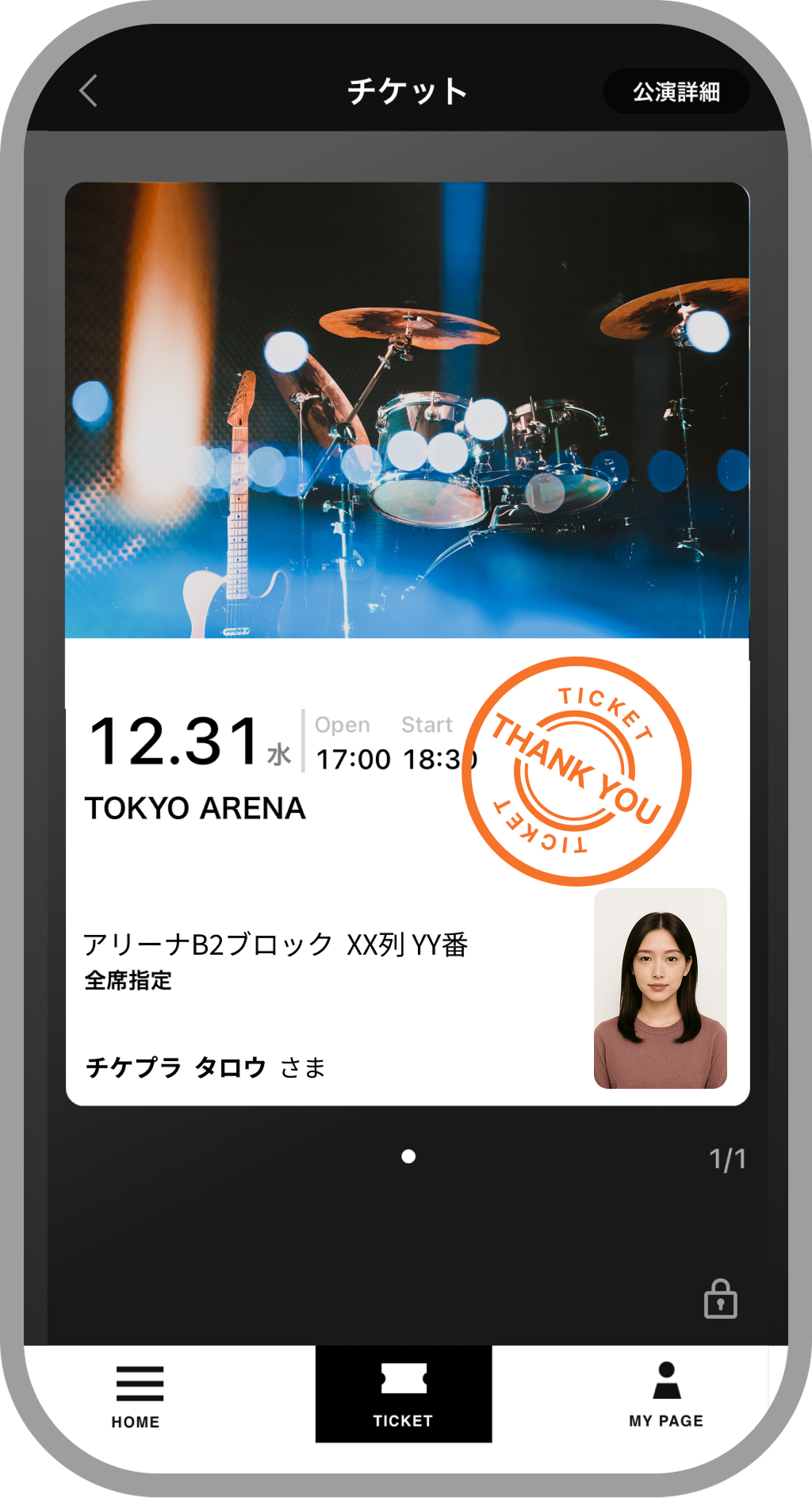
Sample E-tickets with Face Photo
On E-tickets issued via [Ticketplus E-tickets App], the face photo you registered will be displayed.
About Face Photo Registration
OK
Plain or nearly plain background
Person can be clearly identified
Taken within the last 6 months
JPG image within 2 MB and up to 3000 pixels wide
Resolution of at least 240 * 320 pixels (Photos taken with a standard smartphone camera generally meet these conditions.)
NG
Background / Location
Taken inside a car, bus, or train
Background is busy or not plain
Background has been digitally edited to plain white
Cropped out from a photo containing other people
Pets are visible in the photo
Scanned or original ID / certificate-style photo data is used
Image Quality
Overexposed due to lighting or glare
Backlit, causing shadows on the face
Not a color photo
Aspect ratio is distorted (stretched or squashed)
Angle / Gaze
Taken from below (low-angle shot)
Taken from a steep high angle (looking up)
Face is not straight toward the camera or not looking at the camera
Face / Expression
Photo has been edited or filtered (including skin retouching)
Subject is posing
Smiling or other expressions unsuitable for an ID-style photo
Face fills the entire frame
Top of the head is cut off
Bangs covering the eyes
Accessories / Outfit
Wearing sunglasses, hat, scarf, mask, etc. *If you must wear one of these items for medical reasons, please mention this in the remarks field when registering. Thank you for your understanding and cooperation.
Wearing special attire or hairstyle for a wedding or party that is very different from your usual appearance
Registration Deadline
Please complete registration at least 3 days before your performance date. You may register at any time before the deadline; it does not have to be on the performance day.
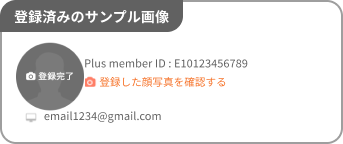
If your screen shows Registration complete as in the example image, your face photo registration has already been completed and you do not need to submit it again.
Guests without registration cannot enter
If you register your photo after the final registration date, the review may not be completed in time for the performance date. To ensure smooth entry on the day of the performance, we recommend registering as early as possible. Please note that guests who have not completed face photo registration will not be allowed to enter.
Important Notes on Registration
Please check the following notes
Once a face photo has been submitted, it cannot be edited or changed until it is marked as not approved (NG) in the review. After approval, the registered face photo cannot be changed until its validity period (3 years) has expired. Please be careful not to upload a wrong photo, such as a photo of someone else.
If your photo falls under any of the NG examples, we will send an email to your registered email address with instructions to register again. If you use spam filters or domain restrictions, please configure your settings to allow emails from “plusmember.jp”. Also, please check in your My Page that the email address you registered at the time of application is correct.
Applicants should share this information page with their companions.
Companions must also log in from the “Proceed to Face Photo Registration” button at the bottom of this page with their own Plus member ID and complete face photo registration.
Identity Verification at Entry
If you do not have a registered face photo, you will be refused entry.
If you have already completed registration, you do not need to register again. You can check your registration status in My Page.
For this performance, identity verification will be conducted for all attendees at entry. If we are unable to verify your identity, you will be refused entry regardless of the reason.
Your E-tickets will show the purchaser`s name and face photo. Identity will be verified by checking the E-tickets at the entrance of each venue.
Even if your face photo is registered, if verification is difficult, we may ask you to present an identity document.
When you come to the venue, please be sure to bring a valid ID that matches the name printed on the ticket. For details on acceptable identity documents, please refer to the official website and the detail page of your E-tickets.
Identity verification may take some time. We appreciate your understanding and cooperation.
For other information regarding the performance, please refer to the guidance on the official website.

 OK
OK
 NG
NG





















 Guests without registration cannot enter
 Submitted face photos will be reviewed in order, giving priority to those whose performance dates are approaching first.
 We will send the review result to your registered email address. If your photo is not approved, please register again.